
For years, Google Workspace has been one of the most popular platforms for professional email hosting. It provides Gmail-based email along with tools like Docs, Drive, Meet, and Sheets.
However, many startups, developers, and businesses are now looking for a Google Workspace alternative that focuses purely on email infrastructure rather than bundled productivity apps.
One platform gaining attention is DeoMail.
DeoMail is designed for teams that want professional domain email, automation workflows, and developer APIs without the complexity and cost of per-user pricing.
In this guide, we’ll explore:
- Why businesses look for Google Workspace alternatives
- What makes DeoMail different
- DeoMail pricing vs per-user pricing
- Automation and developer features
- When DeoMail is the better choice
For a full technical comparison, you can also visit the official comparison page:
👉 https://deomail.com/compare/google-workspace
Why Businesses Look for a Google Workspace Alternative 🤔
Google Workspace is powerful, but it was built as a complete productivity suite, not just an email infrastructure platform.
Many teams primarily need reliable domain email, not an entire bundle of collaboration tools.
Common reasons teams search for alternatives include:
• Per-user pricing costs that increase as teams grow
• paying for apps like Docs or Meet that the team rarely uses
• complicated admin configuration
• lack of built-in automation triggers for incoming email
• limited API flexibility for developers
For startups and developers who simply want programmable email infrastructure, this model can feel unnecessary.
That’s where DeoMail offers a different approach.
What Is DeoMail? 🚀
DeoMail is a modern custom-domain email infrastructure platform designed for professional communication, automation workflows, and developer integrations.
Instead of bundling email with office tools, DeoMail focuses on:
• custom domain email hosting
• automation workflows using DeoMail Fire
• developer APIs
• scalable resource-based pricing
For example, you can create professional email addresses like:
hello@yourcompany.com
support@yourcompany.com
team@yourcompany.com
while maintaining complete control over your domain.
👉 Learn more: https://deomail.com
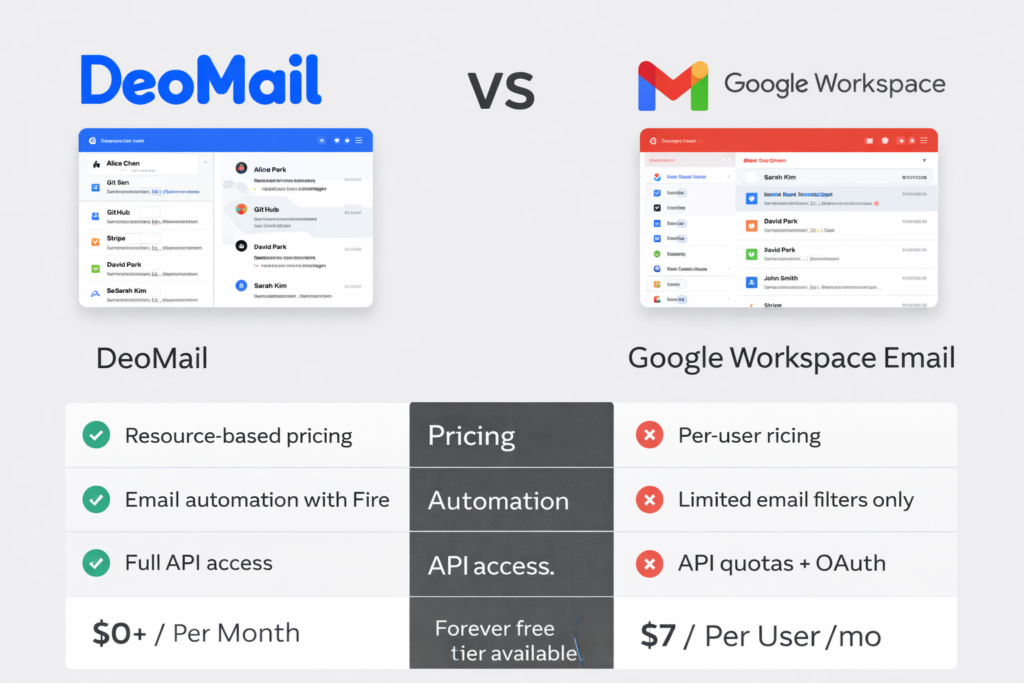
DeoMail vs Google Workspace — Quick Overview
Here is a simple comparison of the two approaches.
| Category | DeoMail | Google Workspace |
|---|---|---|
| Pricing model | Resource-based | Per user |
| Starting price | Free | $7+ per user/month |
| Free plan | Forever free | 14-day trial |
| Automation | Built-in with Fire | Filters only |
| API access | Included free | OAuth + quotas |
| Setup time | ~2 minutes | Admin configuration |
For a deeper breakdown, visit:
👉 https://deomail.com/compare/google-workspace
The Biggest Difference: Pricing Model 💰
The largest difference between DeoMail and Google Workspace is how pricing works.
Google Workspace Pricing
Google Workspace charges per user per month.
Example:
| Team Size | Monthly Cost |
|---|---|
| 1 user | $7 |
| 5 users | $35 |
| 10 users | $70 |
| 25 users | $175 |
Costs scale linearly with team size, regardless of how much infrastructure you actually use.
DeoMail Pricing (Resource-Based)
DeoMail uses resource-based pricing, meaning you only pay for the infrastructure you consume.
| Resource | Price |
|---|---|
| Storage | $0.50 per GB / month |
| Additional Domain | $0.50 per domain / month |
| Extra Mailbox | $1.00 per inbox / month |
| Fire Automation | $2 per 100 executions |
| Team Members | $1 per member / month |
| Extra Organization | $1.90 per org / month |
DeoMail also offers a free tier, allowing users to start with:
| Free Tier Feature | Included |
|---|---|
| Inbox | 1 |
| Domain | 1 |
| Storage | 500 MB |
| Emails per day | 100 |
| Fire automations | 50/day |
| API access | Included |
👉 Pricing details: https://deomail.com/pricing
This pricing model allows teams to scale infrastructure gradually rather than paying per seat.
Email Automation Built Directly Into the Platform 🔥
Traditional email platforms only offer filters or folders.
DeoMail introduces programmable email automation through DeoMail Fire.
Fire allows you to trigger workflows when emails arrive.
Example automation:
| Trigger | Action |
|---|---|
| Email from sales@* | Send Slack notification |
| Email subject contains “Order” | Trigger webhook |
| Support request email | Create CRM ticket |
This allows teams to connect email directly to their workflows without needing external tools.
Developer APIs for Email Infrastructure 👨💻
Another key difference is developer access.
DeoMail provides simple API keys for sending and managing email, making it easy to integrate email into applications.
Example API request:
POST https://api.deomail.com/v1/send
{
  "from": "hello@yourdomain.com",
  "to": ["user@example.com"],
  "subject": "Welcome!",
  "html": "<h1>Hello World</h1>"
}
This makes DeoMail useful for:
• SaaS applications
• backend automation systems
• developer workflows
• webhook-based integrations
When DeoMail Is the Better Choice ⚡
DeoMail is ideal for teams that prioritize email infrastructure and automation over bundled office apps.
DeoMail may be the better choice if you:
✔ want domain email without per-user pricing
✔ need webhook automation for incoming email
✔ want API access for sending and receiving email
✔ prefer flexible infrastructure pricing
✔ want faster setup without complex admin tools
Many startups and developers choose DeoMail because it treats email as programmable infrastructure rather than just a mailbox.
How to Switch to DeoMail
Switching email providers can sound complicated, but DeoMail simplifies the process.
Typical migration steps include:
1️⃣ Export your existing email data
2️⃣ Add your domain to DeoMail
3️⃣ Configure DNS records (MX, SPF, DKIM)
4️⃣ Start using your new inbox
Most setups take less than two minutes.
👉 Get started: https://deomail.com
Read how to register in DeoMail
Final Thoughts
While Google Workspace remains a powerful productivity suite, many teams today are looking for simpler, more flexible email infrastructure.
DeoMail provides a modern alternative by focusing on:
• custom domain email hosting
• built-in automation with DeoMail Fire
• developer-friendly APIs
• predictable resource-based pricing
Instead of bundling email with office software, DeoMail focuses on programmable email infrastructure designed for modern teams.
If you’re searching for a Google Workspace alternative, DeoMail offers a powerful and flexible solution.
👉 Learn more: https://deomail.com
👉 Full comparison: https://deomail.com/compare/google-workspace