
For many organizations, Microsoft 365 has become the standard platform for business communication and productivity. It bundles email with tools such as Word, Excel, PowerPoint, Teams, and OneDrive.
However, many startups and developer-focused teams today are searching for a Microsoft 365 alternative — especially when they only need reliable custom-domain email with automation and APIs, rather than a full office productivity suite.
This is where DeoMail offers a modern alternative.
DeoMail focuses purely on email infrastructure, combining custom-domain email hosting with automation triggers, developer APIs, and resource-based pricing.
In this guide we’ll explore:
- Why teams look for Microsoft 365 alternatives
- What makes DeoMail different
- Pricing differences between DeoMail and Microsoft 365
- Built-in automation and developer APIs
- When DeoMail is the better choice
For the full technical comparison, see:
👉 https://deomail.com/compare/microsoft-365
What Is DeoMail? 🚀
DeoMail is a modern platform designed for professional email infrastructure on your own domain.
Instead of bundling email with office applications, DeoMail focuses on making email programmable and automatable.
Core capabilities include:
• custom domain email hosting
• automation workflows using DeoMail Fire
• developer-friendly REST APIs
• webhook integrations
• flexible resource-based pricing
For example, businesses can create addresses like:
support@yourdomain.com
sales@yourcompany.com
hello@yourstartup.com
and automate workflows around incoming emails.
👉 Learn more: https://deomail.com
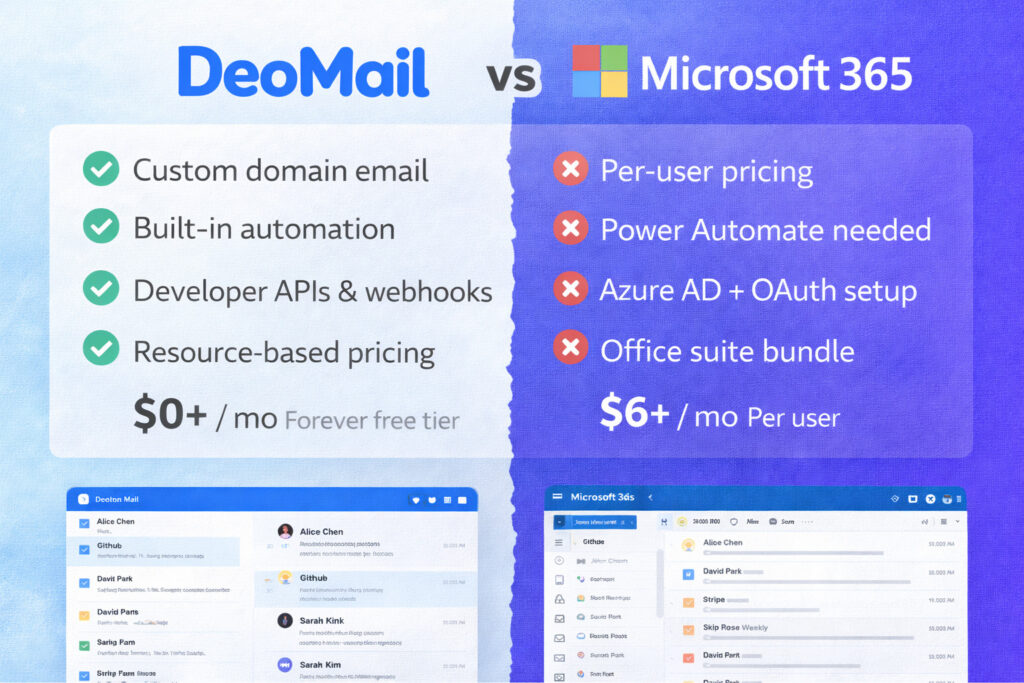
DeoMail vs Microsoft 365 — Quick Comparison
Although both platforms provide business email, their approach is very different.
| Category | DeoMail | Microsoft 365 |
|---|---|---|
| Pricing model | Resource-based | Per user |
| Free tier | Forever free | 1-month trial |
| Automation | Fire webhook triggers | Power Automate |
| API access | Simple API keys | Microsoft Graph |
| Setup | ~2 minutes | Admin portal configuration |
| Ecosystem | Integrations | Office suite |
Full comparison:
👉 https://deomail.com/compare/microsoft-365
The Biggest Difference: Email Infrastructure vs Productivity Suite ⚡
The main difference between DeoMail and Microsoft 365 is their purpose.
Microsoft 365
Microsoft 365 is a complete productivity ecosystem, including:
• Outlook email
• Word, Excel, PowerPoint
• Microsoft Teams
• OneDrive storage
• SharePoint collaboration
It is designed for companies that want a full office suite bundled together.
DeoMail
DeoMail focuses purely on email infrastructure.
This allows the platform to specialize in:
• email automation workflows
• integrations with external tools
• developer APIs
• flexible pricing without per-user fees
Instead of bundling productivity apps, DeoMail integrates with the tools teams already use.
Pricing Comparison 💰
Pricing is another major difference between the two platforms.
Microsoft 365 Pricing
Microsoft 365 typically charges per user per month.
| Plan | Price |
|---|---|
| Business Basic | $6 per user / month |
| Business Standard | $12.50 per user / month |
| E3 Enterprise | $22 per user / month |
For example:
| Team Size | Monthly Cost |
|---|---|
| 5 users | $30+ |
| 10 users | $60+ |
| 25 users | $150+ |
Costs increase linearly as teams grow.
DeoMail Pricing
DeoMail uses resource-based pricing instead of per-user pricing.
This means you only pay for infrastructure usage.
| Resource | Price |
|---|---|
| Storage | $0.50 per GB / month |
| Additional domain | $0.50 per domain |
| Extra mailbox | $1 per inbox |
| Fire automation | $2 per 100 executions |
DeoMail also includes a free tier:
| Feature | Included |
|---|---|
| Custom domain email | Yes |
| Inbox | 1 |
| Storage | 500 MB |
| Emails per day | 100 |
| Fire automations | 50/day |
| API access | Included |
👉 Pricing details:
https://deomail.com/pricing
Built-In Email Automation with DeoMail Fire 🔥
One of DeoMail’s most powerful features is Fire, the built-in email automation system.
Learn more:
Fire allows incoming emails to trigger automated workflows.
Example automations:
| Trigger | Action |
|---|---|
| Email from sales@* | Send Slack notification |
| Order email received | Trigger webhook |
| Support email | Create helpdesk ticket |
| Customer inquiry | Update CRM |
In contrast, Microsoft 365 typically requires Power Automate, which often involves additional licensing.
Developer APIs and Integration Flexibility 👨💻
DeoMail also provides simple REST APIs for developers.
Developers can:
• send emails programmatically
• read inbox messages
• trigger workflows
• integrate email into applications
Example API request:
POST https://api.deomail.com/v1/send
{
  "from": "hello@yourdomain.com",
  "to": ["user@example.com"],
  "subject": "Welcome!",
  "html": "<h1>Hello World</h1>"
}
👉 API documentation:
https://deomail.com/api
Microsoft 365 APIs rely on Microsoft Graph, which typically requires Azure AD configuration and OAuth authentication.
Integrations with Modern Tools 🔗
DeoMail integrates with many external tools through webhooks and APIs.
Examples include:
• Slack
• Zapier
• Make (Integromat)
• CRM systems
• custom APIs
This allows email to become part of automated workflows across your tools.
Microsoft 365 integrations are often centered around Microsoft Teams, SharePoint, and the Office ecosystem.
When DeoMail Is the Better Choice ⚡
DeoMail is ideal for teams that prioritize automation, APIs, and flexible pricing.
Choose DeoMail if you:
✔ want custom domain email without per-user pricing
✔ need built-in webhook automation
✔ want developer APIs with simple authentication
✔ prefer quick setup without admin complexity
✔ use external tools instead of a bundled office suite
Many startups choose DeoMail because it treats email as programmable infrastructure.
When Microsoft 365 May Be the Better Choice
Microsoft 365 may be a better option if you:
✔ need Word, Excel, and PowerPoint collaboration
✔ rely on Microsoft Teams for communication
✔ require enterprise compliance certifications
✔ want 1 TB OneDrive storage per user
✔ already use the Microsoft ecosystem
Both platforms serve different organizational needs.
Getting Started With DeoMail
Setting up DeoMail takes only a few minutes.
Typical steps include:
1️⃣ Add your domain
2️⃣ Configure DNS records (MX, SPF, DKIM)
3️⃣ Create your mailbox
4️⃣ Start sending email
Setup usually takes about two minutes.
👉 Start here:
https://deomail.com
Learn More About DeoMail
If you’re exploring DeoMail for the first time, these resources can help:
API documentation
How to register on DeoMail
👉 https://blog.deomail.com/tutorials/how-to-register-in-deomail/
Google Workspace comparison
Final Thoughts
Microsoft 365 remains one of the most powerful productivity platforms available today.
However, many teams today only need reliable custom-domain email with automation and APIs, not a full office suite.
DeoMail offers a focused alternative by providing:
• custom-domain email hosting
• built-in automation through DeoMail Fire
• developer-friendly REST APIs
• flexible resource-based pricing
• integrations with modern tools
If you’re searching for a Microsoft 365 email alternative, DeoMail provides a powerful and modern solution.
👉 Start here: https://deomail.com
👉 Full comparison: https://deomail.com/compare/microsoft-365